
This page gathers simple, reliable Paladin macros for WoW Classic – usable in Classic Era, Hardcore and Season of Discovery. They’re designed to be easy to remember, avoid keybind bloat, and work well with most UIs and addon setups.

General Paladin Macros
These macros are useful for every spec.
Mouseover Cleanse (Cleanse)
Core support macro – lets you remove debuffs from allies just by hovering their frame, without changing target.
#showtooltip Cleanse
/cast [@mouseover,help,nodead][] CleanseHow it works
Hover any friendly unit frame (party, raid, target frame, nameplate, etc.) and press this keybind to cast Cleanse on them. If you don’t have a mouseover, it works on your current friendly target instead.
Mouseover Blessing of Freedom
Quickly free allies (or yourself) from movement-impairing effects without losing your target.
#showtooltip Blessing of Freedom
/cast [@mouseover,help,nodead][@player] Blessing of Freedom- Hover any slowed / rooted ally → casts Blessing of Freedom on them.
- If you don’t have a valid mouseover, it casts it on yourself.
Bubble + Hearth (Classic “Oh-No” Button)
The classic Paladin escape combo: Divine Shield into Hearthstone.
#showtooltip Divine Shield
/cast Divine Shield
/use Hearthstone
Use this when a run is truly doomed (especially in Hardcore). In groups it can be a grief tool if used at the wrong time, so be mindful of your party.

Holy Paladin Macros
Focus on efficient healing and panic tools.
Mouseover Flash of Light
Core single-target heal macro for raid and dungeon healing – never waste time swapping targets.
#showtooltip Flash of Light
/cast [@mouseover,help,nodead][] Flash of Light- Hover the tank or a low HP player → instant Flash of Light on them.
- If you have no mouseover, it heals your current friendly target instead.
Mouseover Holy Light (Big Heal)
Same idea as Flash of Light, but for your big, slower heals when heavy damage is coming in.
#showtooltip Holy Light
/cast [@mouseover,help,nodead][] Holy Light
Pair this with boss-timer knowledge: pre-cast Holy Light when you know big hits are coming. Use Flash of Light for topping off or lighter damage.
Emergency Lay on Hands
Instant full heal on your current or mouseover target – the ultimate “save this person now” button.
#showtooltip Lay on Hands
/cast [@mouseover,help,nodead][@target,help] Lay on Hands
Lay on Hands has an extremely long cooldown. Use it for real emergencies – usually on the main tank or a critical player in your group.

Protection Paladin Macros
Help manage your threat, cooldowns and utility when tanking.
Start-Attack + Seal + Judgement
Basic builder macro: auto-attack, apply your seal, then judge when the mob is in range.
#showtooltip Judgement
/startattack
/castsequence reset=target Seal of Righteousness, Judgement- On a new target → casts Seal of Righteousness.
- Press again → Judgement to generate threat and apply the debuff.
Consecration + Start Attack
Drops Consecration while making sure you’re actually swinging on something.
#showtooltip Consecration
/startattack
/cast Consecration
Great as your default AoE-threat button at the pull. Hit it as you run into packs to begin building solid aggro.
Oh-Shit Macro – Divine Protection + Health Potion
Gives you damage reduction and uses a health potion in the same keypress during scary moments.
#showtooltip Divine Protection
/cast Divine Protection
/use Major Health Potion
Use this when you expect big melee hits or when healers are struggling. Divine Protection can’t be used together with Divine Shield, so plan your defensive rotation.

Retribution Paladin Macros
These focus on simple DPS rotations and utility.
Seal / Judgement Toggle (Single Key)
Let one button handle your main seal and Judgement without cluttering your bars.
#showtooltip
/castsequence reset=8 Seal of Command, Judgement- Press once → casts Seal of Command (or your chosen seal).
- Press again within the timer → Judgement for damage and debuff.
Hammer of Justice Focus Stun
Stun a focus target (or your main target) on demand – fantastic in PvP and dungeons.
#showtooltip Hammer of Justice
/cast [@focus,harm,nodead][] Hammer of Justice- Set your focus to a kill target or dangerous mob.
- Press this macro to instantly Hammer of Justice them without dropping your current target.
Judgement / Consecration Toggle (Single Key)
Use this to keep a simple single-key damage flow while leveling or in casual content.
#showtooltip
/cast [mod:shift] Consecration; Judgement
Press normally to Judgement your current seal; hold Shift to drop Consecration for extra AoE damage or threat.
How to Create Macros in WoW Classic
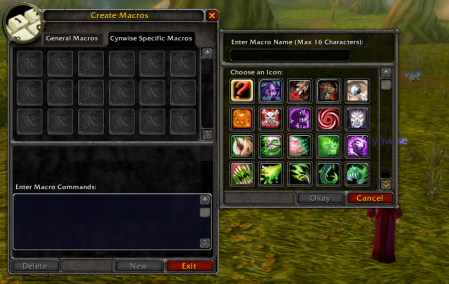
- Press Esc → click Macros (or type /macro).
- Choose General (for all characters) or Character Specific.
- Click New, pick an icon, and give it a name.
- Paste the macro text from this page into the large text box.
- Drag the macro icon onto your action bar.
If a macro doesn’t work:
- Check spelling of abilities (language & rank don’t matter in Classic, but names must match).
- Make sure the skill is learned.
- Try removing other addons that modify macros or action bars.
More Macros for Other Classes
Looking for more macros? Check our other class pages:
- Warrior Macros for WoW Classic
- Mage Macros for WoW Classic
- Rogue Macros for WoW Classic
- Priest Macros for WoW Classic
- Hunter Macros for WoW Classic
- Warlock Macros for WoW Classic
- …and more coming soon on WoWClassicUI.