
This page gathers simple, reliable Priest macros for WoW Classic – usable in Classic Era, Hardcore and Season of Discovery. They’re designed to be easy to remember, avoid keybind bloat, and work well with most UIs and addon setups.

General Priest Macros
These macros are useful for healing and utility across all specs.
Mouseover Heal (Flash Heal)
Core healer macro – lets you heal allies just by hovering their frame, without changing target.
#showtooltip Flash Heal
/cast [@mouseover,help,nodead][] Flash HealHow it works
Hover any friendly unit frame (party, raid, target frame, nameplate, etc.) and press this keybind to cast Flash Heal on them. If you don’t have a mouseover, it heals your current target instead.
Mouseover Dispel (Dispel Magic)
Quick dispels on friends or enemies without changing target – perfect for raids and dungeons.
#showtooltip Dispel Magic
/cast [@mouseover,help,nodead][] Dispel Magic- Use on allies to remove magic debuffs.
- Use on enemies (with a hostile mouseover) to remove magic buffs.
Mouseover Shield (Power Word: Shield)
Instantly shields the right target during spike damage without losing your main target.
#showtooltip Power Word: Shield
/cast [@mouseover,help,nodead][] Power Word: Shield- Hover the tank or a low HP player → press once for a fast shield.
- If no mouseover, it uses your current friendly target instead.

Discipline Priest Macros
Focus on support cooldowns and efficient single-target healing.
Inner Focus + Prayer of Healing
Use this to fire off a big, mana-free group heal during heavy raid or dungeon damage.
#showtooltip Prayer of Healing
/cast Inner Focus
/cast Prayer of Healing
Inner Focus makes your next spell free and increases its crit chance. Combining it with Prayer of Healing gives you a powerful, efficient group heal.
Power Infusion Support Macro
Quickly buff a friendly caster (or yourself) with Power Infusion using mouseover or target.
#showtooltip Power Infusion
/cast [@mouseover,help,nodead][@target,help] Power Infusion- Hover a friendly caster → press to buff them.
- If you don’t have a mouseover, it uses your current friendly target instead.
Tank Heal – Flash Heal on Target-of-Target
Great for healing the tank while you keep the boss or enemy targeted.
#showtooltip Flash Heal
/cast [@targettarget,help,nodead][] Flash Heal
Target the boss or mob, then use this macro to automatically heal whoever they’re hitting (usually the tank).

Holy Priest Macros
Help manage your single-target and group healing more cleanly.
Mouseover Renew
Quickly place Renew on raid members without swapping targets.
#showtooltip Renew
/cast [@mouseover,help,nodead][] Renew- Great for keeping Renew rolling on tanks or players taking periodic damage.
Smite / Holy Fire Toggle (Single Key)
Use one key for your basic Holy damage rotation while leveling or soloing.
#showtooltip
/cast [mod:shift] Holy Fire; Smite
Shadow Priest Macros
These focus on DoT management, interrupts and panic tools.
DoT + Channel Sequence (Shadow Word: Pain + Mind Flay)
Helps you apply SW:P and follow up with Mind Flay on a single target without juggling multiple keys.
#showtooltip Shadow Word: Pain
/castsequence reset=target Shadow Word: Pain, Mind Flay, Mind Flay
This resets when you change target. Tap it once to apply Shadow Word: Pain, then again to channel Mind Flay.
Focus Interrupt (Silence)
Shadow-only, but extremely useful in raids and dungeons to keep a specific caster locked down.
#showtooltip Silence
/cast [@focus,harm,nodead][] Silence- Set your focus to the dangerous caster or boss.
- Press this to interrupt them on cooldown while DPSing something else.
Panic Macro – Psychic Scream + Fade
Fear nearby enemies and quickly drop some threat to reduce the chance they come back to you.
#showtooltip Psychic Scream
/cast Psychic Scream
/cast Fade
Use Psychic Scream carefully in dungeons – feared mobs can pull extra packs if they run too far.
How to Create Macros in WoW Classic
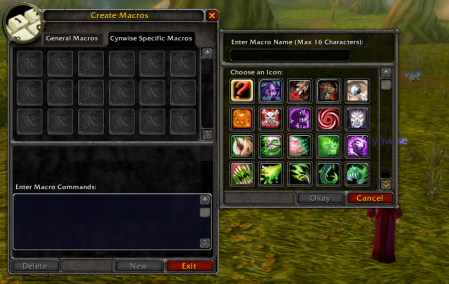
- Press Esc → click Macros (or type /macro).
- Choose General (for all characters) or Character Specific.
- Click New, pick an icon, and give it a name.
- Paste the macro text from this page into the large text box.
- Drag the macro icon onto your action bar.
If a macro doesn’t work:
- Check spelling of abilities (language & rank don’t matter in Classic, but names must match).
- Make sure the skill is learned.
- Try removing other addons that modify macros or action bars.
More Macros for Other Classes
Looking for more macros? Check our other class pages:
- Warrior Macros for WoW Classic
- Mage Macros for WoW Classic
- Rogue Macros for WoW Classic
- etc.










Leave a Reply
You must be logged in to post a comment.