
This page gathers simple, reliable Rogue macros for WoW Classic – usable in Classic Era, Hardcore and Season of Discovery. They’re designed to be easy to remember, avoid keybind bloat, and work well with most UIs and addon setups.
General Rogue Macros
These macros are useful for every spec.
Start-Attack + Ability Macro (Sinister Strike)
Prevents you from standing there doing nothing because your ability is on cooldown – it always starts your auto-attack.
#showtooltip Sinister Strike
/startattack
/cast Sinister StrikeHow it works
Use this pattern with any main ability by replacing Sinister Strike with another spell name (for example Backstab or Hemorrhage depending on your spec).
Mouseover Crowd Control (Sap)
Quickly CC enemies by just hovering them – invaluable for dungeon pulls and hardcore play.
#showtooltip Sap
/cast [@mouseover,harm,nodead][] Sap- Saps your mouseover target (nameplate, 3D model, raid frame, etc.)
- If you don’t have a mouseover, it uses your current target instead
Focus Interrupt (Kick)
Keep an interrupt on your focus without changing your main target – perfect for bosses or dangerous casters.
#showtooltip Kick
/cast [@focus,harm,nodead][] Kick- If you have a focus target set, this always interrupts that unit
- If you don’t, it behaves like a normal Kick on your main target

Assassination Rogue Macros
Focus on finishers and single-target damage.
Cold Blood + Eviscerate
Classic Assassination burst finisher – guarantees a big crit on your Eviscerate when used correctly.
#showtooltip Eviscerate
/cast Cold Blood
/cast Eviscerate
Make sure Cold Blood is talented. Build up to 5 combo points, then hit this macro for a guaranteed big Eviscerate crit.
Stealth Opener – Cheap Shot / Garrote
Use one key for your main stealth opener – default Cheap Shot, or Garrote when holding Shift.
#showtooltip Cheap Shot
/cast [nostealth] Stealth
/cast [stealth,mod:shift] Garrote; [stealth] Cheap Shot- If you’re not stealthed → toggles Stealth
- In Stealth → casts Cheap Shot
- In Stealth + holding Shift → casts Garrote

Combat Rogue Macros
Help manage your builder/spender flow and burst cooldowns.
Sinister Strike / Backstab Toggle (Single Key)
Use one key for your main builder – Sinister Strike when you’re in front, Backstab when you’re behind the target.
#showtooltip
/cast [mod:shift] Backstab; Sinister Strike- Press normally → casts Sinister Strike
- Hold Shift → casts Backstab
Adrenaline Rush + Blade Flurry + Trinkets
Classic Combat “press all your buttons” burst macro for boss burn or heavy cleave.
#showtooltip Adrenaline Rush
/use 13
/use 14
/cast Adrenaline Rush
/cast Blade Flurry
Be careful with Blade Flurry in dungeons – its cleave can pull extra packs if you’re too close to nearby mobs.
Oh-Shit Macro – Evasion + Sprint
Gives you dodge and movement speed in one press to survive bad pulls or get out of danger fast.
#showtooltip Evasion
/cast Evasion
/cast Sprint
Subtlety Rogue Macros
These focus on stealth control, openers and reset tools.
Premeditation + Cheap Shot Opener
Subtlety opener that automatically uses Premeditation before your Cheap Shot to front-load combo points.
#showtooltip Cheap Shot
/cast Premeditation
/cast Cheap Shot
Requires Premeditation talented in Subtlety. Use this from Stealth to start fights with extra combo points for faster control or damage.
Reset Macro – Vanish + Stopattack
Helps you cleanly reset fights or drop threat without accidentally breaking your own Vanish.
#showtooltip Vanish
/stopattack
/cast Vanish- /stopattack prevents your auto-attacks from immediately breaking Vanish
Pull Control – Distract + Sap
Helps you reposition packs with Distract and quickly follow up with Sap on the priority target.
#showtooltip Sap
/cast Distract
/cast Sap
Use this carefully: position yourself, press once to cast Distract, then quickly aim your cursor and press again to Sap your chosen target.
How to Create Macros in WoW Classic
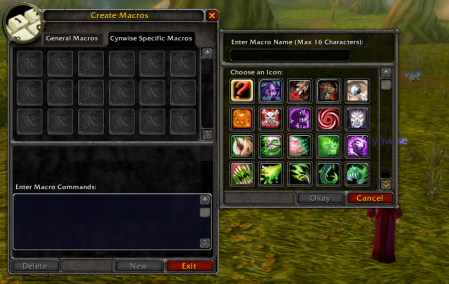
- Press Esc → click Macros (or type /macro).
- Choose General (for all characters) or Character Specific.
- Click New, pick an icon, and give it a name.
- Paste the macro text from this page into the large text box.
- Drag the macro icon onto your action bar.
If a macro doesn’t work:
- Check spelling of abilities (language & rank don’t matter in Classic, but names must match).
- Make sure the skill is learned.
- Try removing other addons that modify macros or action bars.
More Macros for Other Classes
Looking for more macros? Check our other class pages:
- Warrior Macros for WoW Classic
- Mage Macros for WoW Classic
- Priest Macros for WoW Classic
- etc.













Leave a Reply
You must be logged in to post a comment.