Tag: guide

  • TBC Classic Anniversary — PvE DPS Tier List (Phase 1)

    TBC Classic Anniversary — PvE DPS Tier List (Phase 1)

    With The Burning Crusade Classic Anniversary now live, many players are asking the same question: “What are the best PvE DPS specs in TBC?”

    In this article, we break down the PvE DPS tier list for Phase 1 (Gruul’s Lair & Magtheridon), based on both practical raid performance and real-world data from Warcraft Logs (top 10% parses). While raw damage matters, raid utility and composition are just as important in TBC, so we also take that into account when ranking each specialization.

    ⚠️ Important note: This tier list focuses strictly on PvE raid performance at level 70. It does not consider PvP viability, boosting, or 5-man dungeons.


    How the tiers work?

    We use the following ranking system:

    • 🟣 S Tier – Exceptional specialization with top-tier damage and/or indispensable raid utility.
    • 🔵 A Tier – Very strong specialization with solid damage and meaningful raid contribution.
    • 🟡 B Tier – Decent performer, often valued more for utility than raw DPS.
    • 🔴 C Tier – Weak DPS performance in raids; playable but rarely optimal.
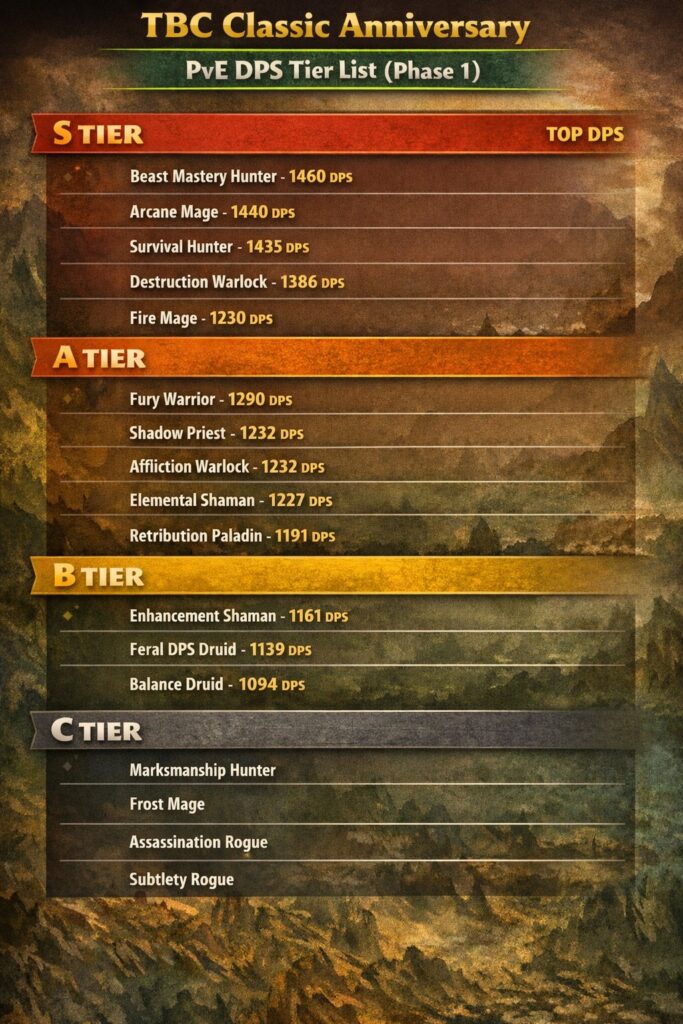
    PvE DPS Tier List – Phase 1 (TBC Anniversary)

    🟣 S Tier (Top Performers)

    These specs dominate damage meters or bring critical raid value.

    • Beast Mastery Hunter1460 DPS
      The strongest overall DPS in Phase 1. High damage, excellent scaling, and reliable performance on almost every encounter.
    • Arcane Mage1440 DPS
      Incredible burst damage and excellent mana efficiency in early TBC raids.
    • Survival Hunter1435 DPS
      Slightly behind BM but still extremely powerful, especially with proper raid buffs.
    • Destruction Warlock1386 DPS
      Strong sustained DPS with great cleave potential and excellent raid utility.
    • Fire Mage1230 DPS
      Competitive damage with great scaling and reliable performance.

    🔵 A Tier (Very Strong Choices)

    High-performing specs that contribute well to raids.

    • Fury Warrior1290 DPS
      Classic warrior scaling with excellent single-target damage.
    • Affliction Warlock1232 DPS
      Strong sustained damage, especially on longer fights.
    • Shadow Priest1232 DPS
      Not the top DPS, but absolutely essential for mana regeneration via Vampiric Touch — many raids bring at least one.
    • Elemental Shaman1227 DPS
      Solid ranged DPS with valuable raid buffs.
    • Arms Warrior1220 DPS
      Slightly behind Fury but still a viable choice.
    • Retribution Paladin1191 DPS
      Lower raw DPS, but excellent utility with buffs like Sanctity Aura.
    • Combat Rogue1170 DPS
      Reliable melee DPS with good raid presence.

    🟡 B Tier (Situational / Utility-Focused)

    Playable, but not optimal purely for damage.

    • Enhancement Shaman1161 DPS
      Decent damage, but shines more for Windfury and group utility.
    • Feral DPS Druid1139 DPS
      Useful hybrid, but often better as a tank or healer in raids.
    • Balance Druid1094 DPS
      Brings Innervate and utility, but falls behind in pure DPS.

    🔴 C Tier (Struggles in Raids)

    These specs can work, but are rarely ideal in Phase 1.

    • Marksmanship HunterNot in top rankings
      Strong in PvP, weak in early TBC PvE.
    • Frost MageNot in top rankings
      Great control, but poor raid DPS compared to Fire/Arcane.
    • Assassination RogueNot in top rankings
      Falls behind Combat in most raid scenarios.
    • Subtlety RogueNot in top rankings
      Primarily a PvP spec in TBC.

    Phase 1 DPS Ranking Snapshot (Top 10% Parses)

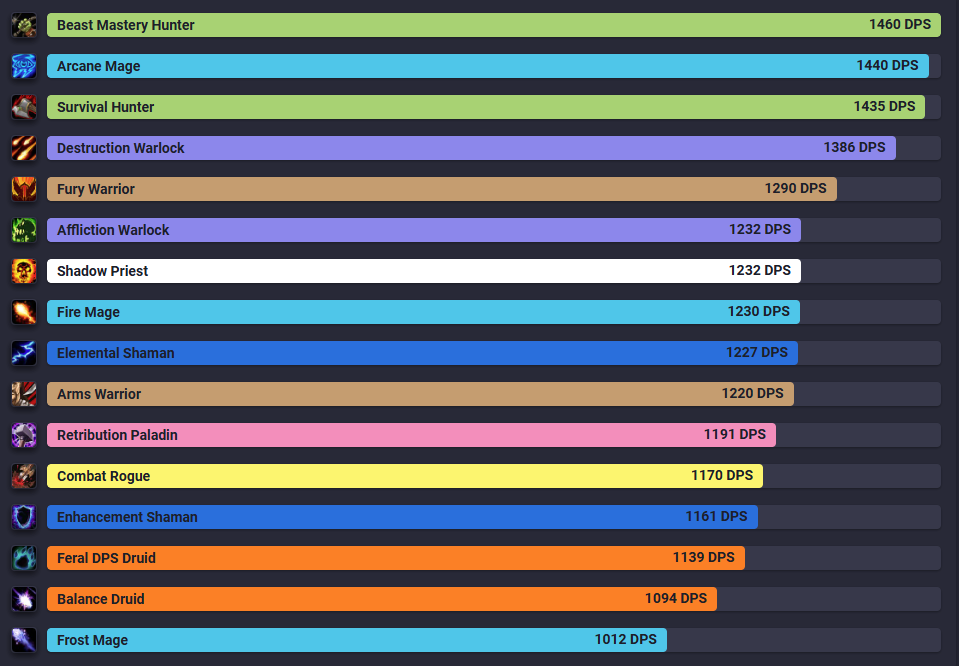
    For reference, here are the Warcraft Logs Phase 1 DPS rankings (top 10%) for Gruul’s Lair & Magtheridon:

    1. Beast Mastery Hunter — 1460 DPS
    2. Arcane Mage — 1440 DPS
    3. Survival Hunter — 1435 DPS
    4. Destruction Warlock — 1386 DPS
    5. Fury Warrior — 1290 DPS
    6. Affliction Warlock — 1232 DPS
    7. Shadow Priest — 1232 DPS
    8. Fire Mage — 1230 DPS
    9. Elemental Shaman — 1227 DPS
    10. Arms Warrior — 1220 DPS
    11. Retribution Paladin — 1191 DPS
    12. Combat Rogue — 1170 DPS
    13. Enhancement Shaman — 1161 DPS
    14. Feral DPS Druid — 1139 DPS
    15. Balance Druid — 1094 DPS

    Read more on WOWTBC.GG – TBC Classic Best DPS Rankings.


    Final Thoughts

    In TBC Classic Anniversary, raid composition matters just as much as raw DPS. Specs like Shadow Priest, Enhancement Shaman, and Retribution Paladin may not top the meters, but they can be invaluable for raid performance.

    If you want to push maximum damage in Phase 1, your best bets are:

    👉 Beast Mastery Hunter, Arcane Mage, Survival Hunter, or Destruction Warlock.
  • Burning Crusade Classic Anniversary: What to Do Before Release (Jan 2026)

    Burning Crusade Classic Anniversary: What to Do Before Release (Jan 2026)

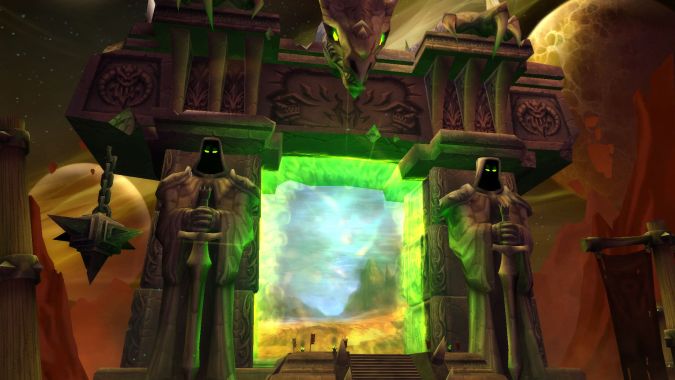
    The Burning Crusade Classic Anniversary is the next major chapter of WoW Classic, following the 20th Anniversary Edition launched on November 21, 2024. Those fresh Classic realms are now progressing toward The Burning Crusade, with the TBC Pre-Patch scheduled for January 13, 2026 and the full expansion launch expected shortly after.

    If you want a strong start — fast leveling, early raid access, gold stability, and a clean UI — the real work happens before the Dark Portal opens. This guide covers everything you should prepare right now.

    Roadmap & Key Dates

    What’s coming and when.

    • Classic Anniversary Realms launched: November 21, 2024
    • TBC Pre-Patch: January 13, 2026
    • TBC Launch: Expected Winter 2025 – Spring 2026 window

    The Anniversary realms are the same servers — your characters progress directly into TBC.


    Anniversary Server Rules & Changes

    How these servers differ from 2019 Classic.

    • Chronoboon Displacer (up to 10 stacks)
    • Improved PvP Honor System (Phase 2)
    • Dual Spec available
    • Instant mail between your characters
    • No buff/debuff limit
    • Graphics & reporting system improvements
    • No GDKP allowed (NA & EU)
    • Faction balance enforcement on PvP servers


    Pre-Patch: January 13, 2026 – What You Must Prepare For

    The real beginning of the expansion.

    • New races: Blood Elves & Draenei
    • New profession: Jewelcrafting (levelable to 300)
    • 15% XP reduction (20–60) & boosted quest XP (30+)
    • Cheaper & earlier mounts
    • New cities: Silvermoon & The Exodar


    What You Should Do Before Launch

    Your real preparation checklist.

    • Lock your main & alt strategy
    • Plan your 60 → 70 leveling route
    • Prepare gold & materials
    • Choose professions & future specializations
    • Configure addons, UI, macros & keybinds
    • Secure your guild & raid position

    Players who dominate TBC are the ones who prepared before the Dark Portal ever opens.


    Launch Week Survival Checklist

    Everything ready before Day One.

    • Bags, gold, consumables prepared
    • Professions mapped & materials stocked
    • Addons updated & UI stable
    • Dungeon & leveling groups organized
    • Server & faction decisions finalized

    Preparation is the real endgame. The players who succeed in TBC Classic Anniversary are the ones who take these months seriously.

    Phase 1 Guides

    Let’s have a look at phase 1 guides.

  • Create Your First Slash Command in WoW Classic (/hello)

    Create Your First Slash Command in WoW Classic (/hello)

    In the first part of this series, we built a tiny addon that prints a message when you log in. Now we’ll make it a bit more interactive by adding your first slash command: /hello.

    When you type /hello in chat, the addon will greet you by name. This is often the next step for new addon authors because slash commands are a simple way to trigger your code on demand.

    What Is a Slash Command?

    Slash commands are those chat commands that start with /:

    • /reload
    • /dance
    • /who
    • …and of course, custom ones like /hello.

    Addons can register their own commands and link them to Lua functions. When you type the command in chat, WoW calls the function you defined.

    Reusing the Same Addon Folder

    We’ll continue using the same addon from part 1:

    World of Warcraft\_classic_\Interface\AddOns\MyFirstAddon\

    You should already have:

    • MyFirstAddon.toc
    • main.lua

    We don’t need to change the TOC file for this step. All the magic will happen inside main.lua.

    Adding a /hello Command

    Open main.lua and start from what we had before:

    local frame = CreateFrame("FRAME")
    frame:RegisterEvent("PLAYER_LOGIN")
    
    frame:SetScript("OnEvent", function()
        print("|cfff4b034MyFirstAddon loaded successfully!|r")
    end)

    Now we’ll add a simple function and register a slash command.

    1. Write the Hello Function

    Add this below the existing code:

    local function MyFirstAddon_SayHello(msg)
        local playerName = UnitName("player")
    
        if msg and msg ~= "" then
            print("|cfff4b034[MyFirstAddon]|r Hello, " .. playerName .. "! You said: " .. msg)
        else
            print("|cfff4b034[MyFirstAddon]|r Hello, " .. playerName .. "!")
        end
    end

    What it does:

    • Gets your character name with UnitName("player").
    • If you type extra text after /hello, it prints that too. Example: /hello nice UI → “You said: nice UI”.

    2. Register the Slash Command

    WoW uses a global table called SLASH_<NAME><number> to connect slash commands with a handler function named SlashCmdList["NAME"].

    Add this under the function you just created:

    SLASH_MYFIRSTADDON1 = "/hello"
    
    SlashCmdList["MYFIRSTADDON"] = function(msg)
        MyFirstAddon_SayHello(msg)
    end

    This means:

    • /hello is now a valid command.
    • Whenever you type /hello, WoW calls the function registered in SlashCmdList["MYFIRSTADDON"].
    • We forward the message (msg) to MyFirstAddon_SayHello.

    Final main.lua Example

    Here’s the complete file so you can compare:

    -- Create a frame to listen to events
    local frame = CreateFrame("FRAME")
    frame:RegisterEvent("PLAYER_LOGIN")
    
    -- When the player logs in, print a message
    frame:SetScript("OnEvent", function()
        print("|cfff4b034MyFirstAddon loaded successfully! Type /hello to test it.|r")
    end)
    
    -- Our hello function
    local function MyFirstAddon_SayHello(msg)
        local playerName = UnitName("player")
    
        if msg and msg ~= "" then
            print("|cfff4b034[MyFirstAddon]|r Hello, " .. playerName .. "! You said: " .. msg)
        else
            print("|cfff4b034[MyFirstAddon]|r Hello, " .. playerName .. "!")
        end
    end
    
    -- Register the /hello slash command
    SLASH_MYFIRSTADDON1 = "/hello"
    
    SlashCmdList["MYFIRSTADDON"] = function(msg)
        MyFirstAddon_SayHello(msg)
    end

    Testing Your /hello Command In-Game

    1. Save main.lua.
    2. (Re)start WoW Classic or type /reload in-game.
    3. On login, you should see:

    MyFirstAddon loaded successfully! Type /hello to test it.

    4. In the chat window, type:

    • /hello
    • /hello this is my first addon

    You should see your greeting messages printed back to you.

    Troubleshooting

    • “Interface action failed because of an AddOn”
      There’s likely a syntax error. Check missing quotes, commas, or end.
    • /hello does nothing
      Make sure MyFirstAddon is enabled in the AddOns menu, and check that the slash name matches exactly: SLASH_MYFIRSTADDON1 and SlashCmdList["MYFIRSTADDON"].

    Where We Go From Here

    You now have:

    • A loading message on PLAYER_LOGIN
    • Your first custom slash command
    • A small reusable function (MyFirstAddon_SayHello)

    Next possible steps:

    • Add /hello help with a small help text
    • Register multiple commands (/hello and /hi)
    • Start creating a simple UI frame to display options instead of only using chat

    Stay tuned — your addon is starting to become interactive, and this is just the beginning of what you can build for your own WoW Classic UI!

  • How to Create Your First WoW Classic Addon: A Beginner-Friendly Introduction

    How to Create Your First WoW Classic Addon: A Beginner-Friendly Introduction

    So you want to create your first addon for WoW Classic? Great choice! Whether you’re looking to add a personal tweak to your UI, build a small quality-of-life feature, or one day release a fully-fledged addon to the community, the whole process is much simpler than it looks.

    This guide is a gentle introduction to the basics — no coding experience required. By the end, you’ll understand how addons are structured, where files go, what the essential components are, and how to prepare your very first working addon.

    What Exactly Is a WoW Addon?

    Addons are small modules written in Lua (a lightweight scripting language) and XML. They allow you to customize WoW’s interface, automate UI behaviors (not gameplay!), display additional information, improve usability, and more.

    They cannot perform rotation automation, botting, or anything that interacts with combat actions — but they can deeply enhance your interface and your overall experience.

    How Addons Are Structured

    Every addon is just a folder placed inside:

    World of Warcraft\_classic_\Interface\AddOns\

    Inside that folder, you typically have:

    • A .toc file — your addon’s “manifest” that tells WoW what files to load.
    • One or more .lua files — your code and logic.
    • (Optional) .xml files — frames, UI definitions, templates.
    • (Optional) Assets — icons, textures, images, sounds.

    A minimal addon contains only a folder + a .toc file + one Lua file.

    Creating Your First Addon (Step-by-Step)

    Let’s start with the simplest addon possible: something that prints a message when you log in.

    1. Create the Addon Folder

    Go to:

    World of Warcraft\_classic_\Interface\AddOns\

    Create a new folder called:

    MyFirstAddon

    (You can replace the name with anything — just avoid spaces.)

    2. Create the TOC File

    Inside the folder, create a file named:

    MyFirstAddon.toc

    Add this content:

    ## Interface: 11502
    ## Title: My First Addon
    ## Notes: A simple test addon for WoW Classic
    ## Author: YourName
    ## Version: 1.0
    
    main.lua

    Important: Update the Interface number for your version of WoW Classic (it changes every major patch). You can check it by looking at any other addon’s .toc file.

    3. Create Your First Lua File

    Now create the file referenced in the toc:

    main.lua

    Put this inside:

    local frame = CreateFrame("FRAME")
    frame:RegisterEvent("PLAYER_LOGIN")
    
    frame:SetScript("OnEvent", function()
        print("|cfff4b034MyFirstAddon loaded successfully!|r")
    end)

    Congratulations — you’ve just created an addon that loads and displays a message when the player logs in.

    Where to See (and Enable) Your Addon

    Start WoW Classic and go to the Character Select screen, then click AddOns in the lower-left corner.

    You should see My First Addon in the list. Make sure it’s enabled, then enter the game. After login, you should see your custom message in the chat frame.

    What You Just Accomplished

    You now understand:

    • Where addons are stored
    • How the .toc file works
    • How Lua code is loaded
    • How to respond to events (like PLAYER_LOGIN)
    • How to print and test basic behavior

    This is the foundation for everything else — frames, slash commands, data storage, UI widgets, and more.

    What’s Next?

    This introduction is the first part of a series. In the next guides, we’ll cover:

    • Adding slash commands (like /hello)
    • Creating your first frame with XML or Lua
    • Saving data between sessions (SavedVariables)
    • Debugging and structuring your addon project
    • Packaging your addon for CurseForge or Wago

    Stay tuned — your first tiny addon is just the beginning of what you can build for your own WoW Classic UI!